Platform Engineering
AwesomeOps Part 6: Windows Server 2022 Ansible Drift Control In-Depth
Published
Jul 5, 2023
Read time
13 min read
Focus
Windows Server 2022 drift control with Ansible, Azure DevOps, and telemetry-backed orchestration
Back by popular demand, it is Windows Server 2022 drift control with Ansible. Mentat ran a LinkedIn poll to see what the AwesomeOps community wanted to read about next, and a deeper dive into Windows Server drift control finished in second place.
This post digs into the ocean of configuration management and covers the engineering patterns a team needs to control drift reliably across Windows Server estates. If you have been following the broader AwesomeOps sequence, this article builds on the earlier image-building and binary-delivery layers and then dives into the lower-level implementation details.
The core idea is simple: start every system from a predictable image, define layered desired-state rules for the operating system, and then repeatedly enforce those rules with automation that can both run on a schedule and respond to telemetry-driven events.
The Setup
To understand drift control within Windows ecosystems, you need to build the platform from the ground up and think of infrastructure and operating-system configuration as layers.
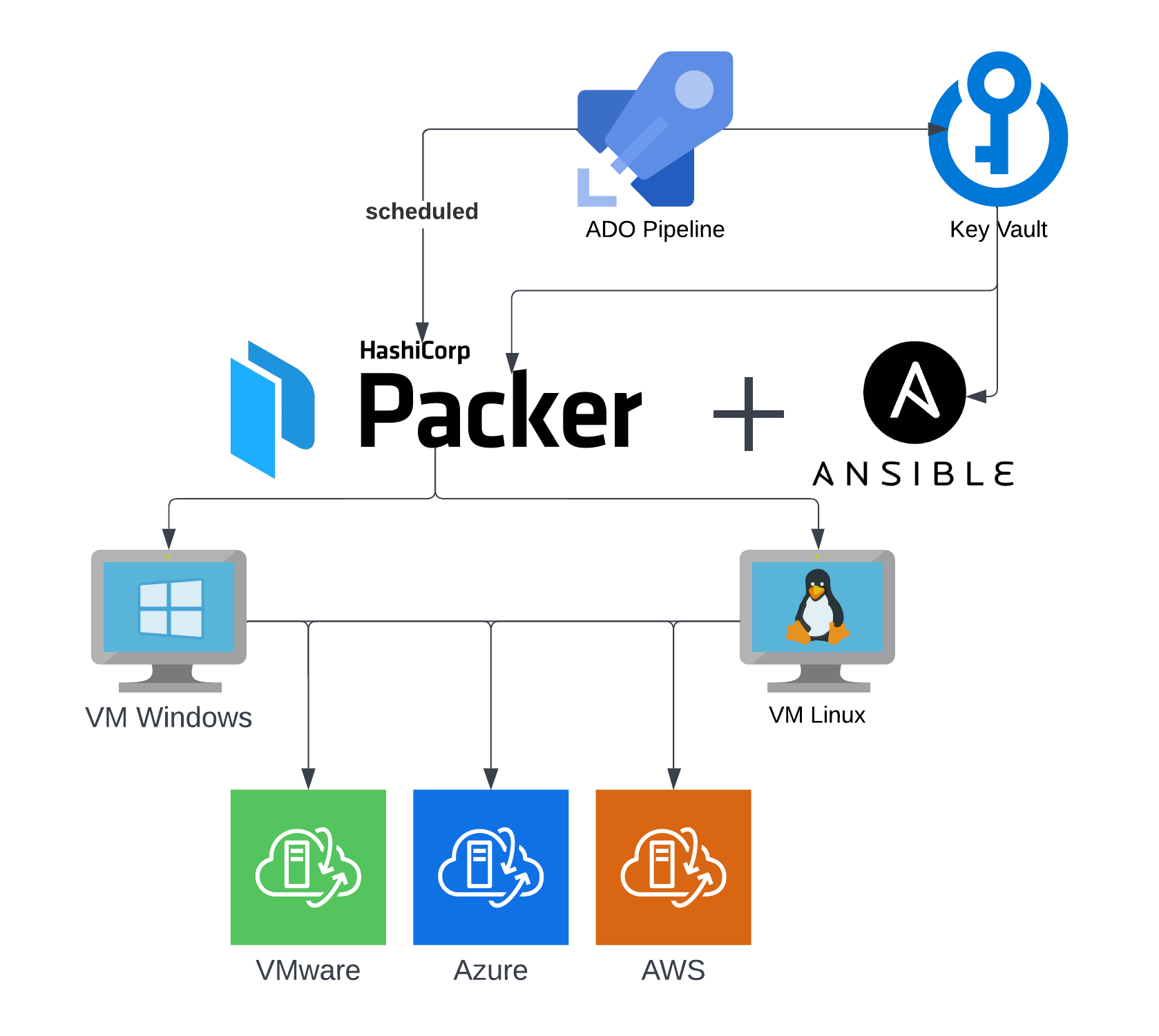
The first layer is the image factory. Mentat’s earlier Packer + Ansible + ADO pattern creates a scalable image-building and distribution platform so that every compute target begins from the same known-good foundation.
That matters because identical starting images reduce mean time to resolution when drift-control failures happen and eliminate the “honeymoon period” of initial drift that often appears right after a new machine is built.
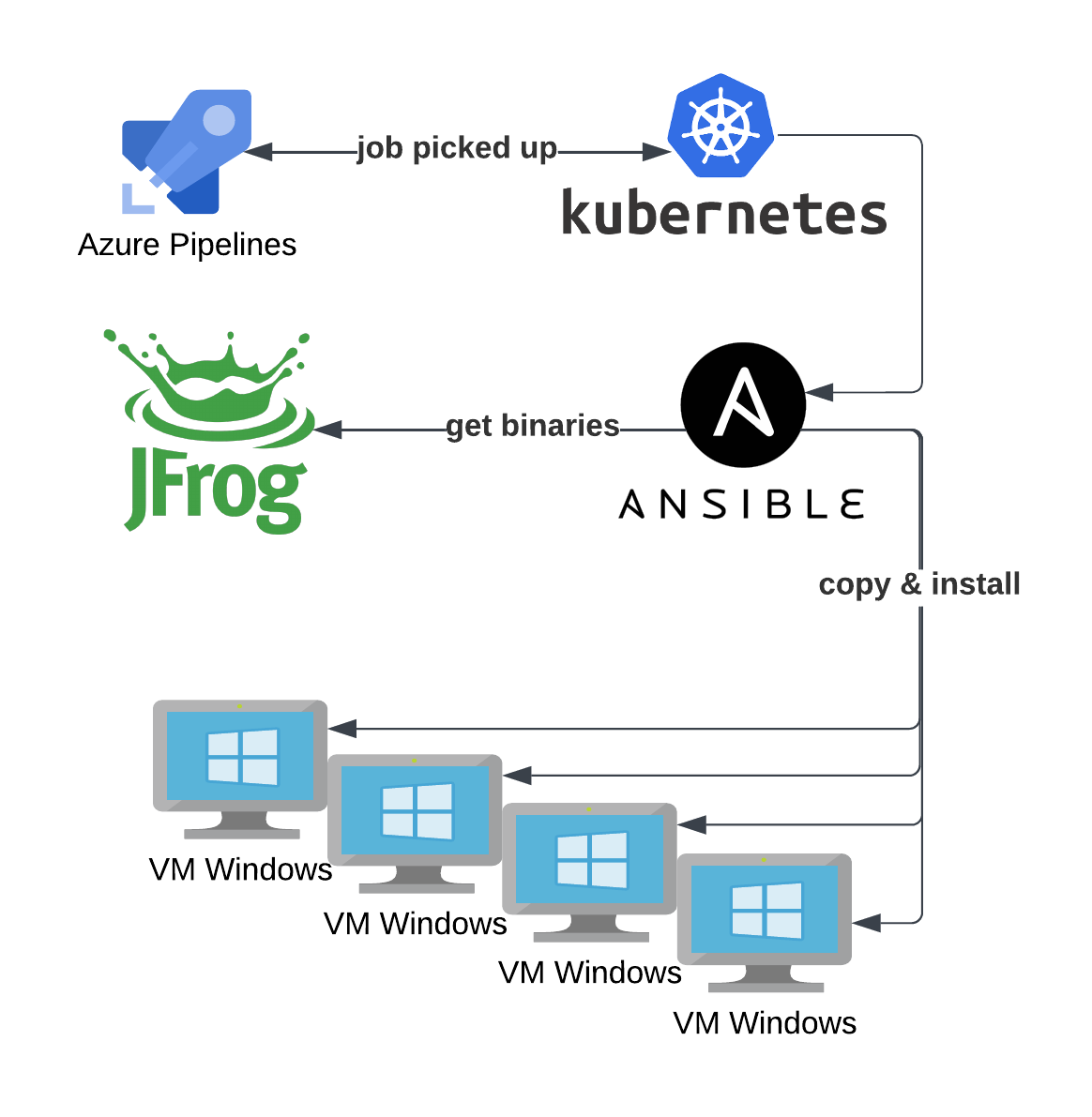
The next layer is binary governance. In Mentat’s Ansible + JFrog + K8s pattern, automation connects to large numbers of Windows hosts in parallel and compares remote binary checksums against a version-controlled source of truth in JFrog. If a checksum differs, the automation downloads and installs the approved package.
Once those image and binary layers exist, the remaining challenge is to define how every other Windows configuration layer should be enforced and how often drift should be evaluated.
Automation Platform Tooling Layers
Mentat frames the drift-control platform itself as a stack of automation capabilities that work together rather than a single playbook run in isolation.
Operating System Layers
At the Windows operating-system level, drift planning also needs explicit layers so teams can reason about what is truly mandatory and what can vary by application or environment.
In-Depth: Start with the Baseline
Mentat treats baseline configuration as the minimum viable machine. These are the settings that make a Windows host allowed and capable of operating inside the environment.
Starting from the baseline creates the strongest layer of defense against manual intervention. Teams may eventually need exceptions in higher layers when application owners resist a particular agent or setting, but they cannot safely abandon the baseline. Without the baseline, fundamental enterprise behaviors stop working.
A common pattern is to create a main Ansible task file that gathers facts and then imports layer-specific task files like baseline configuration, user-account management, and version-specific security tasks.
---
- name: Gather facts about host
  ansible.builtin.setup:
  tags:
    - always
    - gather_facts

- name: Print facts about host
  when: "'gather_facts' in ansible_run_tags"
  debug:
    msg: "{{ ansible_facts }}"
  tags: gather_facts

- name: Windows configuration tasks
  block:
    - name: Include Baseline Windows Config
      import_tasks: baseline_config.yml
      tags:
        - packer
        - drift_control
        - baseline_config

    - name: Include tasks for user accounts
      import_tasks: users.yml
      tags:
        - packer
        - drift_control
        - users

    - name: Include Security Tasks
      import_tasks: security_config.yml
      when:
        - "'10.0.20348' in ansible_distribution_version"
        - ansible_os_family == 'Windows'
      tags:
        - drift_control
        - version2022
Baseline Examples: Time, Power, Desktop Services, and Updates
One example baseline check is time synchronization. Drift control can query the configured NTP servers, compare them to the approved value, and only rewrite the registry and restart the time service when the host is out of compliance.
Time configuration sounds mundane until Kerberos authentication starts failing because clocks drift too far apart. It also matters for security, since NTP manipulation can be part of man-in-the-middle attack chains.
- name: Retrieve NTP server list
  win_shell: |
    $ntpServers = Get-ItemProperty -Path "HKLM:\SYSTEM\CurrentControlSet\Services\W32Time\Parameters" -Name "NtpServer"
    $ntpServers.NtpServer -split ',' | ForEach-Object { $_.Trim() }
  register: __ntp_servers

- name: Set NTP on Host
  win_shell: |
    Set-ItemProperty -Path HKLM:\SYSTEM\CurrentControlSet\Services\W32Time\Parameters -Name NtpServer -Value {{ your_ntp_server }}
    Stop-Service w32time
    Start-Service w32time
when: __ntp_servers.stdout_lines[0] != {{ your_ntp_server }}- name: Set Power plan if not properly configured
win_power_plan:
name: high performance
- name: Update Timezone configuration
win_timezone:
timezone: Eastern Standard Time- name: Configure Remote Desktop Services Local Policy
win_regedit:
path: HKLM:\Software\Policies\Microsoft\Windows NT\Terminal Services
name: LicensingMode
data: 4
type: dword
state: present
- name: Configure Remote Desktop Services Settings
win_regedit:
path: HKLM:\Software\Policies\Microsoft\Windows NT\Terminal Services
name: LicenseServers
type: string
data: localhost
state: present
- name: Set Windows update to manual
win_regedit:
path: HKLM:\Software\policies\microsoft\windows\windowsupdate\AU
name: AUOptions
data: 0x1
type: dword
state: present
- name: Set Windows update to manual - update AU
win_regedit:
path: HKLM:\Software\policies\microsoft\windows\windowsupdate\AU
name: NoAutoUpdate
data: 0x1
type: dword
state: presentProxy, Directories, Features, and Host Activation
After the first baseline items are in place, the platform can enforce enterprise proxy standards, create working directories for drift logging and binary storage, remove unwanted Windows features, and validate licensing on every run.
These are the kinds of low-level controls that are tedious to fix by hand but easy to keep clean once the desired state is encoded well.
- name: Configure IE proxy settings to apply to all users
  win_regedit:
    path: HKLM:\SOFTWARE\Policies\Microsoft\Windows\CurrentVersion\Internet Settings
    name: ProxySettingsPerUser
    data: 0
    type: dword
    state: present

- name: Configure IE to use explicit proxy "{{ site_proxy }}" host with port and without auto detection
  win_inet_proxy:
    auto_detect: yes
    proxy: "{{ site_proxy }}"

- name: Create Drift Control Directory
  ansible.windows.win_file:
    path: C:\Windows\driftcontrol
    state: directory

- name: Create Drift Control Directory Logs
  ansible.windows.win_file:
    path: C:\Windows\driftcontrol\logs
state: directory- name: Remove Windows telnet client feature
win_feature:
name: telnet-Client
state: absent
include_management_tools: no
include_sub_features: no
- name: Configure {{ ansible_fqdn }} for system for KMS server IP
win_shell: cscript slmgr.vbs /skms "{{ kms_server }}"
args:
chdir: C:\Windows\System32\
- name: Activate {{ ansible_fqdn }} Windows License
win_shell: cscript slmgr.vbs /ipk "{{ kms_2022_key }}"
args:
chdir: C:\Windows\System32\
failed_when: falseSecurity and Enterprise Tooling Layers
Once the baseline is solid, the next logical layer is security and enterprise tooling. Much of the hardening can be baked into the image with CIS-aligned automation, leaving drift control to enforce the controls that still need periodic correction.
A simple but effective example is rotating and disabling the Guest account every time drift control runs. That way, even if someone enables the account manually, the next drift cycle resets the password and disables it again.
- name: Generate Complex Password for the Guest Account
  set_fact:
    random_guest: "{{ lookup('ansible.builtin.password', '/dev/null', length=8, encrypt=sha512_crypt, chars=['ascii_letters', 'digits', 'punctuation']) }}"
  no_log: true

- name: Set Random Complex Creds On Guest Account
  win_user:
    name: Guest
    password: "{{ random_guest }}"
    state: present
    account_disabled: yes
    password_never_expires: no
    update_password: always
Binary Drift: JFrog + Checksums + Service Awareness
Mentat’s preferred pattern for enterprise agents and supporting binaries is to use Artifactory as the source of truth and let Ansible decide whether a package actually changed.
The workflow is to download metadata from JFrog, inspect the returned checksum, and then run the rest of the install logic only when the binary actually changed or when the machine is being built by Packer.
The caution here is important: some enterprise applications need more than checksum validation. In many environments you also want service checks to confirm that an application is not only installed but actually running. In practice, many enterprises combine both strategies.
---
- name: BgInfo Download Binary from Artifactory
  win_get_url:
    url: "{{ artifactory_url }}/BgInfo.zip"
    dest: "{{ drift_binaries_dir }}"
    validate_certs: false
    force: false
    use_proxy: false
  register: __artifactory

- name: Setup BgInfo if Checksums Differ OR if Packer
  when: (__artifactory.changed | bool == true) or
        (packer | bool == true)
  block:
    - name: BgInfo Unzip Package Into {{ drift_binaries_dir }}
      community.windows.win_unzip:
        src: "{{ drift_binaries_dir }}\BgInfo.zip"
        dest: "{{ drift_binaries_dir }}"

    - name: Configure BgInfo folder
      win_file:
        path: C:\BgInfo
        state: directory

    - name: Copy BgInfo
      win_copy:
        src: 'C:\Windows\drift\services\BgInfo\'
        dest: C:\BgInfo\
        force: no
        register: copy_result
        remote_src: yes

    - name: Configure BgInfo registry
      win_regedit:
        path: HKLM:\software\microsoft\windows\currentversion\run
        name: BgInfo
        type: string
        data: c:\bginfo\bginfo.exe /NOLICPROMPT /TIMER:0
        state: present
Scheduling Drift Control with Azure DevOps
Once enough Ansible layers exist, the next step is end-to-end testing and orchestration. Mentat uses Azure DevOps as the scheduling and orchestration layer to execute drift-control playbooks on a recurring interval.
The specific pipeline engine does not matter as much as the discipline: schedule the playbook, decide what action mode it should run in, and make sure inventory, tags, limits, and supporting repositories are all driven by predictable variables.
---
variables:
  - group: drift-variables
  - name: pool
    value: the-name-of-your-agent-pool
  - name: ansible_project
    value: ansible
  - name: ansible_repo
    value: ansible-windows-drift-common
  - name: repo_branch
    value: ${{ replace( variables['Build.SourceBranch'], 'refs/heads/', '' ) }}
  - name: ansible_playbook
    value: ./roles/drift/tasks/drift_control.yml
  - name: ansible_inventory_path
    value: "-i inventory.yml"
  - name: limit_var
    value: -l localhost,10.0.0.0
  - name: provider
    value: "vmware"
  - name: scheduled_pipeline
    value: true
  - name: apply_environment
    value: drift_ansible_apply_scheduled

parameters:
  - name: action
    displayName: Action to perform.
    default: report
    values:
      - report
      - execute
  - name: verbosity
    displayName: "Please set the verbosity level:"
    type: string
    default: "-v"
    values:
      - "-v"
      - "-vv"
      - "-vvv"
      - "-vvvv"
      - "-vvvvv"

trigger:
  branches:
    exclude:
      - '*'

schedules:
  - cron: 0 13 * * *
    displayName: Daily at 8am EST
    branches:
      include:
        - develop
    always: true
From Scheduled Drift to Event-Driven Remediation
Mentat pushes the pattern further by combining scheduled drift control with telemetry-driven execution. The article’s later example describes using centralized metrics and condition-based triggers to react when a service drifts across multiple hosts.
One example compares a telemetry value like a CrowdStrike drift count and fires a workflow when that count crosses a threshold. That turns drift control into a blend of scheduled maintenance and event-driven automation.
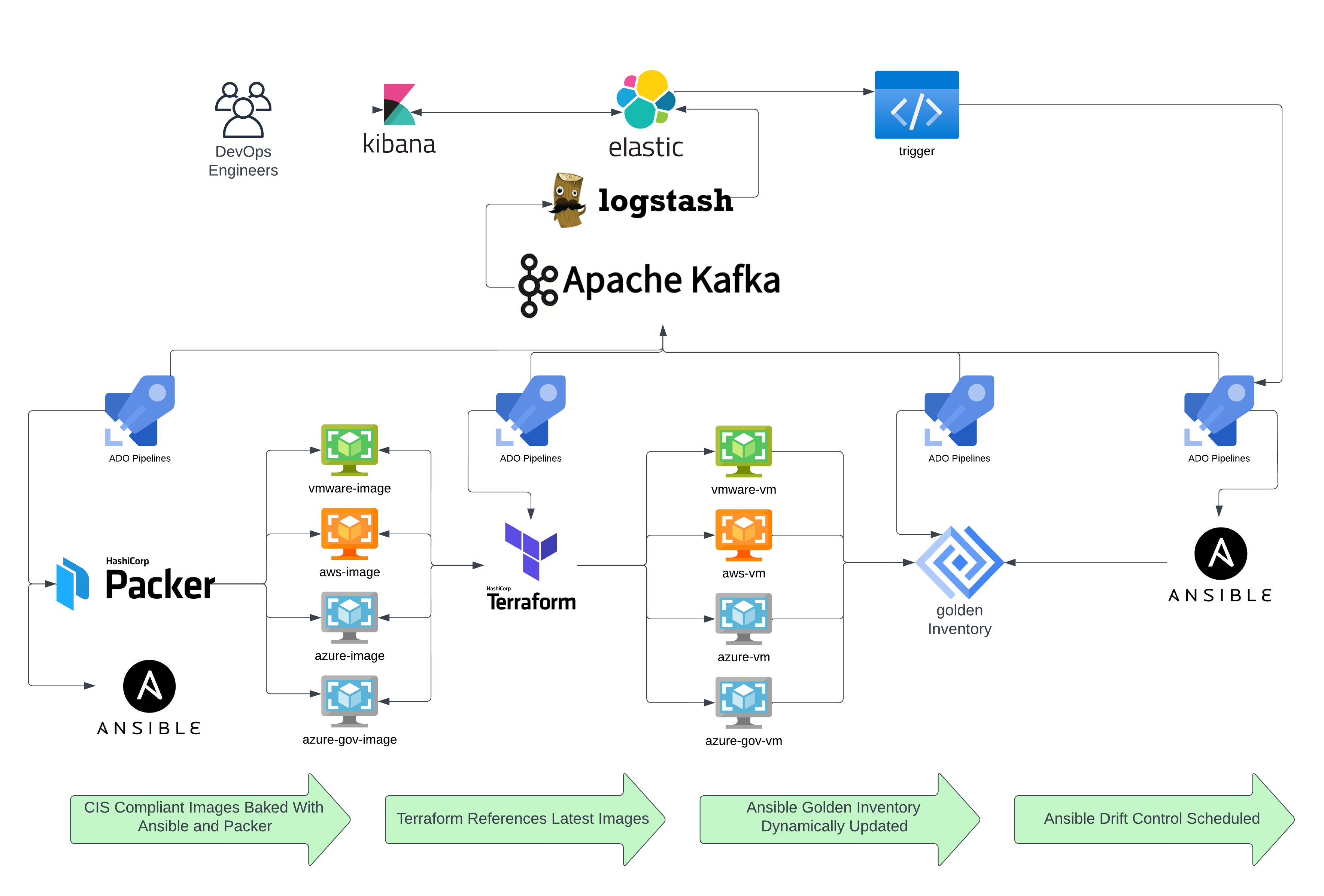
The payoff is flexible orchestration. Teams can choose time-of-day execution, use one or many metrics as conditions, and automatically target the exact nodes that have drifted. That creates a practical bridge between classic scheduled drift control and event-driven architecture.
{
  "condition": {
    "compare": {
      "automation.ansible.drift.service.crowdstrike.hits.total": {
        "gte": 5
      }
    }
  }
}
Conclusion
That is the Windows Server 2022 deep dive on drift control with Ansible. The article’s through-line is that drift control is not a single playbook or a single registry setting. It is a layered platform that starts with identical images, uses version-controlled binaries, enforces minimum viable machine baselines, and then coordinates remediation through both scheduled and event-driven execution.
For organizations running large Windows estates, that layered approach makes drift less chaotic, easier to troubleshoot, and far more sustainable over time.
Next on the AwesomeOps track, Mentat heads into the quantum realm by training a security-focused machine-learning model on IBM’s quantum computing platform.
That progression fits the broader Mentat pattern well: practical systems engineering first, then the frontier research work that might eventually compress complex training and remediation loops even further.
References
Related old-site post: Packer + Ansible + ADO — https://www.mentat.cloud/post/awesomeops-part-2-demystifying-windows-automation-with-ansible
Related old-site post: Ansible + JFrog + K8s — https://www.mentat.cloud/post/ansible-jfrog-awesomeops
Ansible module docs: https://docs.ansible.com/ansible/latest/collections/ansible/windows/win_feature_module.html
Key takeaway
Ready to automate smarter?
Windows drift control works best when teams treat the platform as layered automation: identical image foundations, strict baseline enforcement, controlled security and tooling layers, and orchestration that can both schedule and react to drift events.