Platform Engineering
Preflight Check for Ansible Code Before Take Off
Introduction
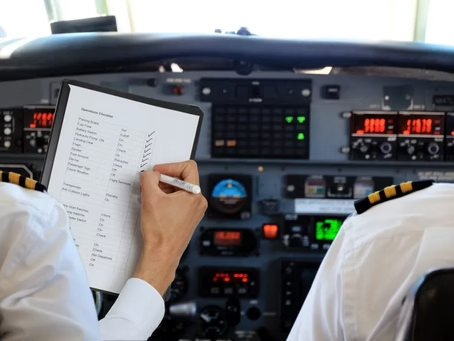
In this modern age, most of us have taken a trip by plane. In aviation, a preflight checklist is a list of tasks that should be performed by pilots and aircrew prior to takeoff. Its purpose is to improve flight safety by ensuring that no important tasks are forgotten. Would you ever get on a plane knowing that had not been done prior to take off? I do not think so.
Never be sure unless you check it again, double check and be safe all the time. — Saziso Lucas
These same principles should be applied to code execution. As developers it is near impossible to detect formatting, syntax issues, and security leaks at scale; especially when pipelines are automated. Fear not. There is a way to add an automated preflight check before our code reaches the runway.
Solution Tech Stack
Technical Summary
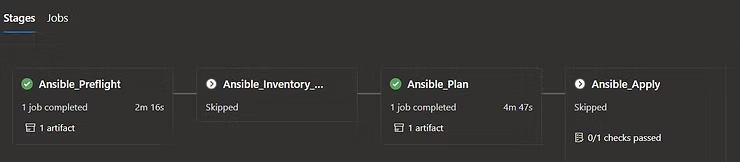
The focus of this article will be on scanning, linting, and testing Ansible code before actual execution of Ansible playbooks as a safety measure. Our pipeline platform is Azure DevOps (ADO), but the type of pipeline tool you use does not really matter because the same principles can be applied with any DevOps pipeline tool. The important thing to note is that the Ansible preflight stage runs before any other stage in our pipeline.
Fundamentally what will happen in this preflight check stage is our Ansible code will be checked out on the branch specified by the pipeline. This might be a default branch or a user-provided input for branch name when testing a feature branch.
Note: You will notice the creation of a temporary directory. That simply allows us to throw away the temp folder when done with the stage so that our environment can remain clean.
Gitleaks Check
First, the local version of that repository will be run through Gitleaks. We then publish the results of the report as an artifact that can be retrieved later. If there are no secrets leaked in the code then the pipeline proceeds.
- task: AzureCLI@2
  displayName: Gitleaks
  condition: or(eq(variables['Agent.JobStatus'], 'Failed'), eq(variables['bypass_gitleaks'], 'false'))
  inputs:
    scriptType: bash
    scriptLocation: inlineScript
    azureSubscription: $(tf_azure_service_connection)
    addSpnToEnvironment: true
    failOnStandardError: false
    inlineScript: |
      cwd=$(pwd)
      ANSIBLE_REPO="$(ansible_repo)"
      cd $cwd/ansible-temp-"$(Build.BuildId)"/${ANSIBLE_REPO}
      gitleaks --path=./ --redact -vvv --report=gitleaks_report.json

- task: PublishPipelineArtifact@1
  displayName: Publish Artifact for Gitleaks
  condition: or(eq(variables['Agent.JobStatus'], 'Failed'), eq(variables['bypass_gitleaks'], 'false'))
  inputs:
    targetPath: ansible-temp-$(Build.BuildId)/$(ansible_repo)/gitleaks_report.json
    artifactName: preflight_artifacts
Syntax and Lint Checks
Next, we do an Ansible syntax check on the code. Notice the variables in the Ansible playbook command allow us to dynamically pass information to our syntax check.
- task: AzureCLI@2
displayName: Ansible Syntax Check
inputs:
  scriptType: bash
  scriptLocation: inlineScript
  azureSubscription: $(tf_azure_service_connection)
  addSpnToEnvironment: true
  inlineScript: |
    export AZURE_CORE_OUTPUT=""
    export ANSIBLE_COLLECTIONS_PATHS=./collections/
    echo "Running Ansible syntax check"
    ANSIBLE_REPO="$(ansible_repo)"
    cd ansible-temp-"$(Build.BuildId)"/${ANSIBLE_REPO}
    set -x
ansible-playbook $(ansible_playbook) $(ansible_inventory_path) $(ansible_inventory_repo_path) --syntax-check -vvv- task: AzureCLI@2
displayName: Ansible Lint
inputs:
scriptType: bash
scriptLocation: inlineScript
azureSubscription: $(tf_azure_service_connection)
addSpnToEnvironment: true
inlineScript: |
export AZURE_CORE_OUTPUT=""
export ANSIBLE_COLLECTIONS_PATHS=./collections/
echo "Running Ansible lint"
ANSIBLE_REPO="$(ansible_repo)"
cd ansible-temp-"$(Build.BuildId)"/${ANSIBLE_REPO}
echo 'ansible-lint $(ansible_playbook) -x 05,301,204,601,602 --force-color -q -v'
ansible-lint $(ansible_playbook) -x 05,301,204,601,602 --force-color -q -v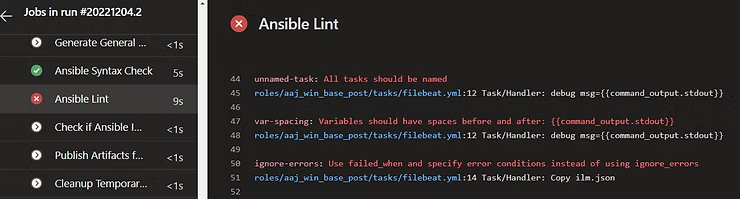
If all is well, the pipeline proceeds. There are several other things that we have put into the preflight check stage such as evaluating the Ansible inventory. If the Ansible inventory exceeds 10 hosts, it requires a human to approve the continuation of the pipeline. This is a great place for you to place other preflight check necessities to ensure your code runs smoothly and safely.
In the event that one of these tasks fails, it will halt the pipeline and produce similar output to this.
What a great safety harness when developing code on a feature branch. The code can be reviewed before the pull request process even takes place. It also allows for an opportunity to review the quality of the code and implement Ansible best practices before code release.
It may not catch every bug or fault within the code. However, any means to provide an automated way to detect these anomalies is best to do so before your users do. Or worse, a CSO.
Outcomes
Key takeaway
Ready to automate smarter?
Automated preflight checks catch secrets, bad syntax, and lint failures before Ansible code ever reaches execution.